Cake quote PDF: how to send it on WhatsApp and close faster
By Bakerly Team · Published on August 31, 2026
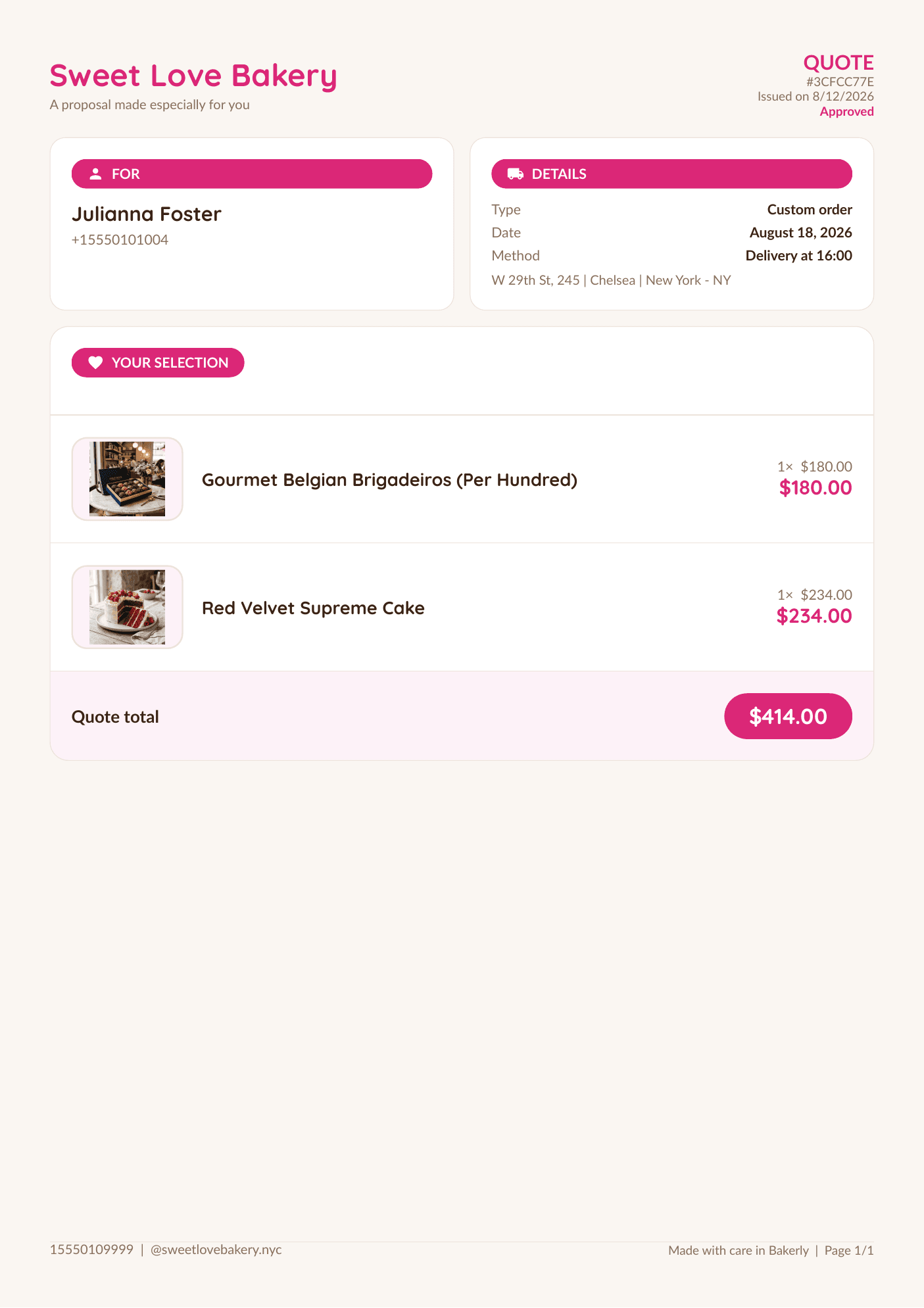
There's a huge difference between dropping a "that'll be $180" into the conversation and sending an organized document, with your brand, listing the cake, the flavors, the date and the terms. The first looks like a guess; the second looks like a serious bakery. That's why a PDF quote closes more orders than a bare number in the chat.
In this post you'll see why the PDF makes a difference, what it needs to include, and how to send it on WhatsApp without spending your night building a document in Word. If you're still unsure what to write in the quote, start with the guide on how to put together a quote that closes orders.
Why send a PDF instead of just text
- It looks professional: a document with your brand shows you take the order seriously.
- It stays on record: the customer keeps the file and no one "remembers it differently" come delivery time.
- It pulls everything together: product, price, what's included and the terms in one place, no scrolling back through the chat to find them.
- It works on any phone: a PDF opens the same for everyone, no app required.
Trust is built in the details
The customer isn't just comparing prices — she's deciding who to trust for an important moment. A carefully made quote answers, before she even asks: "with this baker I won't have any headaches."
What your PDF quote needs to include
- Your brand: bakery name, contact info and a logo, if you have one.
- The customer's details and the delivery date.
- Product description: type of cake, flavor, filling, size or number of slices, decoration.
- The price and what's included (and what isn't, like the cake topper or delivery).
- Terms: payment method, deposit to reserve the date, and how long the quote is valid.
How to send it on WhatsApp without wasting time
Building this in Canva or Word for every order is exactly what makes most people give up and go back to the bare price. What works is having the quote generated from the order's details: you fill in the items once and the document comes out ready to send.
And after she receives it?
The best quote is the one the customer can accept right away. Instead of waiting for a "go ahead" lost in the chat, a confirmation link makes it clear that she approved — and it avoids the mix-up of thinking it was booked when it wasn't.
How Bakerly helps
In Bakerly, you put the order together once — customer, items, flavors, price and terms — and the system generates a PDF quote with your brand, ready to send on WhatsApp in seconds. You also set the validity of each quote, and the customer can confirm with a link.
And because the quote is born from the order, when she approves it everything is already recorded in the dashboard — you just change the status, no retyping and no separate spreadsheet. See also the full list of features.
What to take home
- A PDF quote builds more trust and closes more orders than a bare price in the chat.
- It needs your brand, the customer's details, the full description, the price with what's included, and the terms.
- Generate the PDF from the order so you're not building a document from scratch every time.
- Let the customer confirm with a link — it's clear that she approved and the order comes in already organized.
Stop doing math in a notebook
Bakerly organizes your bakery's orders, pricing, schedule, and finances all in one place. Create your account and get started today, starting at $9.99/month, no commitment.
Create my accountWant to check it out first? See how the system works.